

To create a margin on the left edge of music which will be visible on the screen (to shift all the music to the right a little) place the caret in the top line (any line is OK, but it's easier to use the top line), then select View|Label Selected Line(s) (or hit Ctrl+L). This will present a small dialog in which you can enter a number of spaces (up to 31). You are giving the line a label consisting solely of spaces, but all lines will be shifted right to make room for this "fake" label -giving the effect of a left margin on the screen. You will not be able to enter text (other than line labels), symbols, or anything else in this gap however.
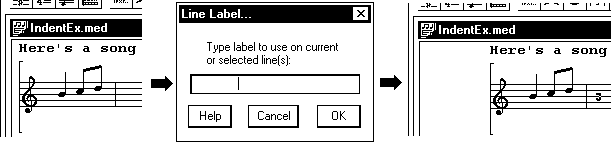
If the spacing isn't right go back to the top line and hit Ctrl+L again, then adjust the number of spaces. (This is mentioned briefly on pg. 39 of the manual).