

Some classical scores use a "C" with a line through it to represent "Barre At...". MusEdit doesn't have the ¢ symbol built-in, but you can get it via:
Start Menu|Programs|Accessories|System Tools|Character Map
Find the ¢ symbol and copy it to the clipboard. Right-click on the staff where you want to insert the Barre notation, then click on the Insert Staff Text button (Ctrl+Shift+T), hit Ctrl+V to paste the ¢ symbol, then add the fret number ( in roman numerals or regular numbers ). Finally, enter a down pointing right bracket This is the result:
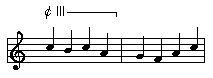
This notation will affect translation from treble to tab - See "EnteringStringNumberAndBarreNotation.htm"
